

A few years ago, when we talked about AI in accounting, the question was simple: can we use it? Is it even good enough?
Fast forward to 2026 and that question is dead. Everyone I talk to, including me, is using AI. The real question now is: how are we using it?
Most teams are just dabbling. They save a few hours here, a few there, but the gains never really add up over a month. The teams that get real leverage are the ones using AI in a way that compounds, where the work doesn't just get faster, it leaves your plate and stays gone.
That's the lens I want to walk through here: three distinct phases of AI maturity in accounting, and how autonomy increases as you move through them.
Before you read further, take a second and think about where you or your team actually sit right now. Are you just starting to dabble with a few prompts in Claude? Have you bought AI-enabled tools that extract information faster but you're still posting everything yourself? Or have you gotten to fully autonomous agents that own the workflow end to end? Keep that answer in mind as we go.
Phase One: Homegrown
This is where most of us started. You're chatting with ChatGPT, Gemini, or Claude (and I keep mentioning Claude because, as of today, it's probably the most popular one in finance and accounting). You're building your own workflows, testing prompts, seeing what the tool can actually do.
Some of the most common things I see teams doing at this phase:
- Bank and GL reconciliations. You feed in a bank statement and some ERP GL data, give Claude basic instructions, and ask it to reconcile against your journal entries. It's a great first taste of what AI can do.
- Deferred revenue schedules. I did this myself: we had a list of SaaS customer contracts pulled from HubSpot, and with a handful of prompts, Claude built out a deferred revenue schedule that was genuinely solid.
- Forecasting. Pull financials from your ERP, give the model some assumptions, and have it build a 12 or 24 month forecast, including best case, standard, and worst case scenarios. You can keep tweaking it as you go.
- Dashboards and summaries. Export data from your ERP or spreadsheets on headcount and assumptions, and build a clean, presentable dashboard for internal leadership or the board.
The upside here is real. It's fast to spin up (a working prototype in hours, not days), it's fully customizable since you're just chatting your way to something better, and there's no vendor dependency because you haven't signed anything.
The downside is that it's fragile. The workflow lives with the person who built it. If I build a prompt and leave next week, whoever inherits it might sort of get it, but the underlying data and assumptions change and that context walks out the door with me. And in accounting specifically, there's usually no audit trail or controls, which becomes a real problem the moment an internal or external audit rolls around. There's also no fallback plan. If something breaks, you're troubleshooting it alone.
Phase Two: Co-Pilot
Phase two is where things get more structured. You're now paying for a product, there's a team behind it, and the AI is either infused into software you already use or built from the ground up with AI capabilities. The core idea is that it assists. You're still doing a lot of the actual work, but the tool is surfacing anomalies, insights, and coordination you didn't have before.
I'd guess a lot of teams are sitting somewhere between phase one and two right now, layering both.
A few examples I see constantly:
- Close management tools that run your month-end checklist and surface insights through pattern detection, proposing journal entries, running flux analysis, or building roll forward schedules.
- AI-enabled ERPs. There's been an explosion of these, and I'd split them into two camps: legacy ERPs bolting on AI, and ERPs built ground-up to be AI-native. The second category is the more interesting one. I've used one firsthand, and being able to chat with your ERP in plain English and pull information instantly is a genuinely new experience for accountants. The catch is that switching to one of these means committing real time and resources to a full migration.
- Expense tools that automatically scan and categorize expenses, flag likely fraud, and catch duplicates or missing bills using pattern recognition.
One thing worth calling out: even when teams adopt these tools, most still layer in phase one usage on top, running things through ChatGPT or Claude alongside the vendor tool, to squeeze out more productivity.
The pros here are genuine and I don't want to undersell them. You get real time savings, lower adoption risk because there's a vendor support team behind you (which matters a lot if you're not naturally comfortable with new tech), and these are often mature, established products just now shipping smarter capabilities.
The honest con: you're adding a layer, not a new model. The bottleneck doesn't move. The tool flags things, monitors things, orchestrates things, but you're still the one doing the work. It doesn't come off your plate, it just gets easier to manage. And there's a real gap between the pitch and the experience. You might save eight hours using the tool, but spend two or three of those hours working around some limitation, so the net gain ends up smaller than you'd imagined.
I call this the co-pilot trap. These tools watch the work, flag the work, monitor the work, but they don't replace it. You're not changing the model. You're adding a layer on top of the same one.

Phase Three: Autonomous
This is the paradigm shift. Instead of assisting, the agent owns the workflow end to end. Your role, and your team's role, shifts from doing the work to reviewing and supervising it.
Right now this is a small group of early movers, but it's growing fast. And because you're putting real trust into the system, vendor choice matters more here than at any other phase.
Here's what it looks like in practice. Every controller knows the month-end scramble: the month ends, you've got 20 items on the list, maybe you knocked out five during the month, and now you're racing through the other 15. It's manual, and the risk of error is highest right when you're moving fastest.
In a phase three setup, agents are running 24/7 throughout the month, continuously working prepaids, accruals, payroll, JEs, and recons as the data comes in. So by day one of close, maybe you're not at 100%, but you're at 90%+, and what's left is genuinely just the 10% that needs judgment.
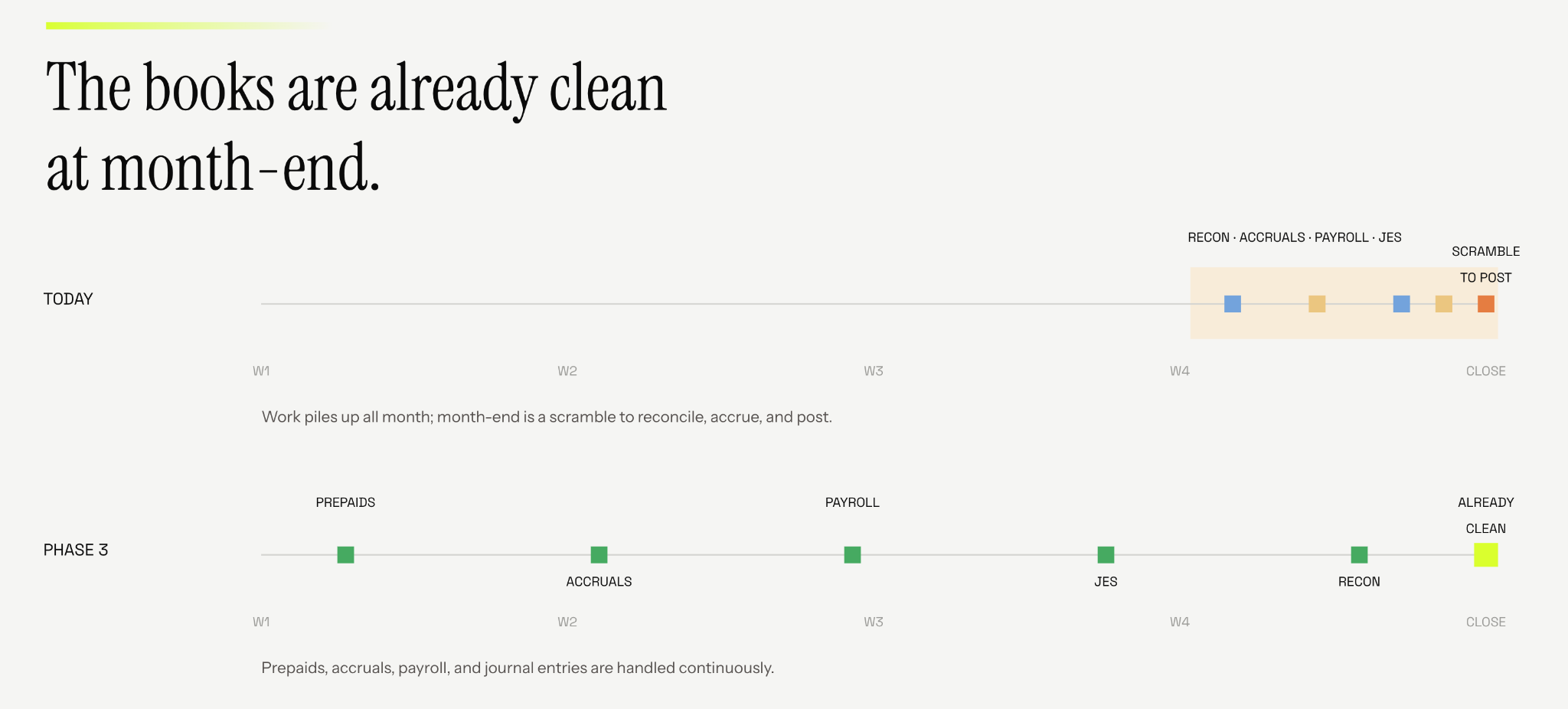
The biggest pro across all three phases sits here: you're not accelerating the process, you're removing the task from your plate entirely. That's a different thing than working faster. It frees your time for higher value work instead of the manual close grind.
The con is that this requires real trust. You're letting the system analyze and post directly to your ERP, and it has to earn that trust over time. I'll be honest, as an accountant, letting go of that control is genuinely hard. But this is where materiality thresholds become useful. You can set a rule like: anything under $5,000, post automatically, I'll review later. Anything above $5,000, or anything hitting a specific GL, surface it to me first before it posts. You keep control, you just get to decide where you want to spend it.
Auditability matters more here than anywhere else. When an agent is posting entries autonomously, you need a clear, readily available trail, both internally and for external audit, showing exactly what the agent did, what it changed, and when.
You don't need to jump straight to phase three

This isn't a race to phase three, and I don't think phase three is automatically "better" for every team today. It's about understanding where you actually sit right now. It's fine to stay in phase one while you build comfort, and fine to stay in phase two while you build trust in a vendor. As AI and the tooling around it keep improving, phase three is where the most value will concentrate. So take the time you need in phase one and two, but keep an eye on where this is heading, because if everyone else moves to phase three and you don't, you'll be the one playing catch up.
Ask yourself three questions:
- Where is the most manual time going on your team today, and which AI tools could make that better, or make it disappear entirely?
- What would you actually need to trust an AI to post an entry on its own? Thresholds you control? The ability to customize it to your workflow?
- What would you do with your time if reconciliations (or whatever your most manual task is) just got done?
Your answers probably point to the phase you're ready for next.
At Kinter, we're fully focused on building phase three AI agents, and we'd love to show you what that looks like in practice. If you want to see it firsthand, book a demo with us.